Chromium Blog
News and developments from the open source browser project
Chrome 55 Beta: Input handling improvements and async/await functions
Friday, October 21, 2016
Unless otherwise noted, changes described below apply to the newest Chrome
Beta
channel release for Android, Chrome OS, Linux, Mac, and Windows.
Input handling improvements
As usage of the mobile web grows, it is increasingly important for sites to react well to touch input. Historically, this meant handling
MouseEvent
and
TouchEvent
separately, which can be difficult to maintain. Chrome now
enables unified input handling
by dispatching
PointerEvents
.
PointerEvents
lead to more responsive pages, as they don’t block scrolling by default. To achieve the same performance with
TouchEvent
, pages can use
passive event listeners
.
Chrome also now supports two new ways to respond to input. The
touch-action
CSS property
enables sites to react to gestures such as panning. For mouse buttons, the new
auxclick
input event type
allows sites to manage the click behavior of non-primary buttons.
Async and await functions
Asynchronous JavaScript can be difficult to reason about. Promises help avoid the nesting problem of callbacks, but Promise-based code can still be difficult to read when a site has large chains of asynchronous dependencies. Chrome now supports the
async
and
await
JavaScript keywords, allowing developers to write Promise-based JavaScript that can be as structured and readable as synchronous code.
Fetching a URL and logging the response using Promises:
function
logFetch(url) {
return
fetch(url)
.
then
(response => response.text())
.
then
(text => {
console.log(text);
}).
catch
(err => {
console.error(
'fetch failed'
, err);
});
}
The same code using async and await:
async
function
logFetch(url) {
try
{
const
response = await fetch(url);
console.log(await response.text());
}
catch
(err) {
console.log(
'fetch failed'
, err);
}
}
CSS automatic hyphenation
Formatting text to fill available space can be a challenge across devices and screen sizes. Chrome now supports
CSS automatic hyphenation
, one of Chrome’s most frequently requested layout features, on Android and Mac. CSS hyphenation allows the browser to hyphenate words when line-wrapping, improving the visual consistency of text blocks. Hyphenation support will be extended to other platforms in future releases.
A paragraph rendered with and without automatic hyphenation
Other features in this release
The
once
event listener option
enables callbacks to be invoked only once before removing the event listener.
Sites can now mark web storage as
persistent
, preventing Chrome from automatically clearing storage for that site.
Cross-origin iframes now require a user gesture to start audio playback using the
Web Audio API
o
n Android, matching the behavior of the
<audio>
and
<video>
elements
.
The TLS stack now implements
GREASE
, a mechanism to help prevent problems with buggy TLS servers.
Developers can create a
MediaStreamTrackEvent
in an alternative way with its new JavaScript constructor.
RSA-PSS signature algorithms have been added to TLS to prepare for
TLS 1.3
.
To
improve load times and prevent failed navigations
,
cross-origin and parser-blocking scripts injected using
document.write()
will no longer load over 2G connections
.
AudioNode
constructors of the form
new AudioNode(context, options)
are now available, making it simpler to manage audio from scripts.
When the media player is too narrow to show every button, an
overflow menu
will appear to provide the hidden functionality to users.
Chrome media controls will now
display a download button
when the playback is associated with a file that can be downloaded.
The
Web Share API
is available for
experimentation
as an
origin trial
.
Deprecations and interoperability improvements
BaseAudioContext
will replace
AudioContext
in the
Web Audio API
to conform to spec.
CSS Clipping Path properties no longer require the
webkit
prefix.
The
MediaStream
constructor is now available without prefix alongside the existing
webkitMediaStream
.
Non-script
MIME types
will no longer trigger script execution.
<textarea maxlength="">
and
<textarea minlength="">
have been updated to count each line break as one character, instead of two.
The
webkit
prefix has been removed from the
imageSmoothingEnabled
property of
CanvasRenderingContext2D
.
Posted by Dan Ehrenberg, Asynchronous Adventurer
Canary channel for Chrome on Android
Tuesday, October 18, 2016
Chrome supports multiple
release channels
with varying degrees of stability and support. The Canary channel ships the most bleeding edge version of Chrome possible. It is primarily intended to be used by developers and early adopters to test recent Chromium changes, but anyone can install it and give it a try. Previously the Canary channel was only available on Windows and Mac, and it is now
available for Android
as well.
Just like the Canary channel for other platforms, new versions are built from the most recent code available and often contain a variety of new features, enhancements, and bug fixes. These builds are shipped automatically with no manual testing, which means that the build can be unstable and may even stop working entirely for days at a time. However, the goal is for Canary to remain usable at all times, and the Chrome team prioritizes fixing major issues as quickly as possible.
Initially, builds will ship every weekday. In the future new builds may also be available on weekends. The frequency of builds means that keeping the app updated will consume a lot of data, typically more than 100MB per week. This is especially important for phones set to update native apps over cellular data.
We hope the Canary channel will be useful when developing and testing changes for Chrome on Android. If you encounter any bugs, please help us by
reporting them
.
Posted by Alex Mineer, APK Administrator & Bug Basher
Chrome 54 Beta: Custom Elements V1, BroadcastChannel, and media platform improvements
Thursday, September 15, 2016
Unless otherwise noted, changes described below apply to the newest Chrome
Beta
channel release for Android, Chrome OS, Linux, Mac, and Windows.
Custom Elements V1
Complex user interfaces often require a large amount of HTML. Most languages allow developers to create their own components built on top of language primitives to mitigate this kind of verbosity. Custom elements
allow developers to create their own custom HTML tags
, and define the new element’s API and behavior in JavaScript. This enables a browser-native way to build reusable, interoperable components.
Chrome 54 provides support for the latest custom elements
V1 spec
, which is broadly agreed-upon by major browser vendors. Chrome will also continue to support the
V0 API
until enough developers have moved to V1.
BroadcastChannel
It is not uncommon for desktop users to have multiple windows or tabs open simultaneously. Some sites utilize this behavior, such as web editors that open documents in their own tabs. Historically, communicating between those tabs has been difficult.
BroadcastChannel
is a new one-to-many messaging API between windows, tabs, iframes, web workers, and service workers. It allows scripts to establish named channels to send messages between browsing contexts of the same origin.
Media platform improvements on Chrome for Android
Media is an increasingly large and important part of the browsing experience on mobile devices that requires fluidly utilizing the entire screen. Developers can now use
Element.requestFullScreen()
to trigger full screen mode after a
screen orientation change
in addition to after a user gesture. This allows experiences like rotate-to-fullscreen for media players.
In addition to fullscreen improvements, Chrome on Android now persists the media notification of a backgrounded
HTMLVideoElement
, allowing a user to continue playing videos while they aren’t visible. Developers can detect background video playback by using the
Page Visibility API
.
Playing background videos in Chrome 54.
Other features in this release
Navigations initiated in an unload handler
will be blocked
and any prior navigation will continue.
The
imageSmoothingQuality
attribute for
CanvasRenderingContext2D
allows developers to balance performance and image quality by adjusting resolution when scaling.
Sites can use
Node.getRootNode(options)
to obtain the root for a given node.
Using
PushSubscription.options
, sites can track
applicationServerKeys
without having to store them offline.
The
Resource Timing API
now supports
transfer
,
encoded
, and
decoded
size attributes, allowing developers to measure cache hit rates and byte usage.
The
user-select
property enables developers to specify which elements can be selected by the user and how.
Foreign F
e
tch
and
WebUSB
are available for experimentation as
origin trials
.
The
text-size-adjust
property allows sites to control whether font size automatically scales on mobile devices.
Deprecations and interoperability improvements
To match behavior in other browsers, embedded YouTube Flash players will be rewritten by Chrome to use the HTML5 embed style, improving performance and security on Chrome Desktop.
CacheQueryOptions
now conforms to spec across all
CacheStorage
methods.
initTouchEvent
has been removed in favor of the
new TouchEvent()
constructor.
SVGZoomEvent
has been removed as it is no longer part of the SVG 2.0 spec.
SVGSVGElement.currentView
,
SVGSVGElement.useCurrentView
,
SVGViewSpec
interface, and
SVGSVGElement.viewport
have been removed
as they are no longer part of the
SVG 2.0 spec
.
SVGTests.requiredFeatures
attribute
has been deprecated since it no longer provides useful functionality in the SVG 2.0 spec.
SVGElement
now supports the
dataset
property.
The
KeyEvent.keyIdentifier
field has been removed in favor of the
KeyboardEvent.key
field.
window.external.IsSearchProviderInstalled()
and
AddSearchProvider()
are now no-ops, since they are unsupported in most other browsers.
Posted by Marijn Kruisselbrink, Broadcast Buccaneer
Moving Towards a More Secure Web
Thursday, September 8, 2016
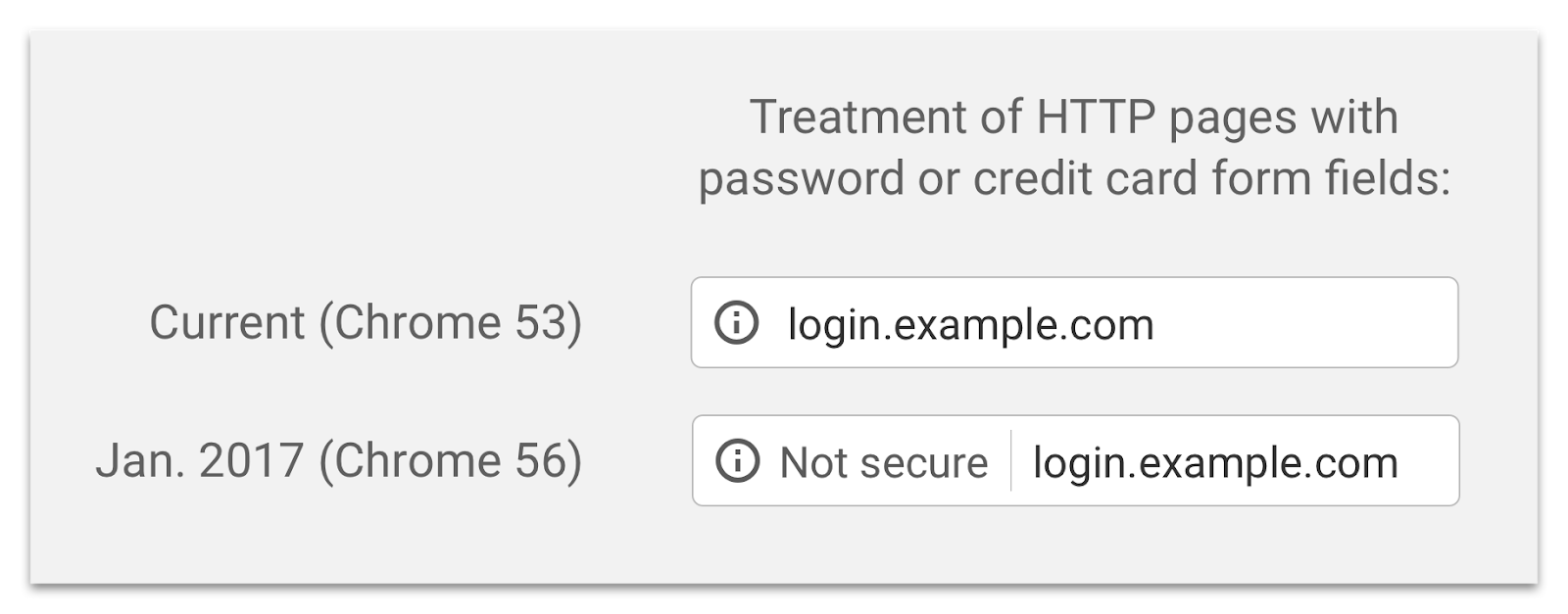
To help users browse the web safely, Chrome indicates connection security with an icon in the address bar. Historically, Chrome has not explicitly labelled HTTP connections as non-secure. Beginning in January 2017 (Chrome 56), we’ll mark HTTP pages that collect passwords or credit cards as non-secure, as part of a long-term plan to mark all HTTP sites as non-secure.
Chrome currently indicates HTTP connections with a neutral indicator. This doesn’t reflect the true lack of security for HTTP connections. When you load a website over HTTP, someone else on the network can look at or
modify
the site before it gets to you.
A substantial portion of web traffic has transitioned to HTTPS so far, and HTTPS usage is consistently increasing. We recently hit a milestone with more than half of Chrome desktop page loads now served over HTTPS. In addition, since the time we
released our HTTPS report
in February, 12 more of the top 100 websites have changed their serving default from HTTP to HTTPS.
Studies show that users
do not perceive
the lack of a “secure” icon as a warning, but also that users become blind to warnings that occur too frequently.
Our plan
to label HTTP sites more clearly and accurately as non-secure will take place in gradual steps, based on increasingly stringent criteria. Starting January 2017, Chrome 56 will label HTTP pages with password or credit card form fields as "not secure," given their particularly sensitive nature.
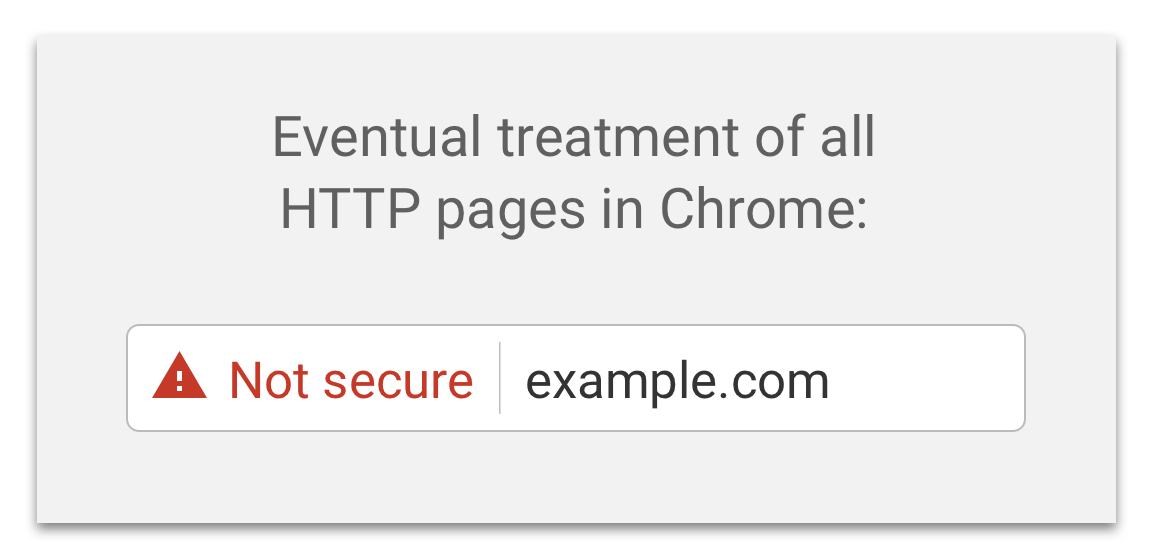
In following releases, we will continue to extend HTTP warnings, for example, by labelling HTTP pages as “not secure” in Incognito mode, where users may have higher expectations of privacy. Eventually, we plan to label all HTTP pages as non-secure, and change the HTTP security indicator to the red triangle that we use for broken HTTPS.
We will publish updates to this plan as we approach future releases, but don’t wait to get started moving to HTTPS. HTTPS is
easier and cheaper than ever before
, and enables both the
best
performance
the web offers and
powerful
new
features
that are too sensitive for HTTP. Check out our
set-up guides
to get started.
Posted by Emily Schechter, Chrome Security Team
Labels
$200K
1
10th birthday
4
abusive ads
1
abusive notifications
2
accessibility
3
ad blockers
1
ad blocking
2
advanced capabilities
1
android
2
anti abuse
1
anti-deception
1
background periodic sync
1
badging
1
benchmarks
1
beta
83
better ads standards
1
billing
1
birthday
4
blink
2
browser
2
browser interoperability
1
bundles
1
capabilities
6
capable web
1
cds
1
cds18
2
cds2018
1
chrome
35
chrome 81
1
chrome 83
2
chrome 84
2
chrome ads
1
chrome apps
5
Chrome dev
1
chrome dev summit
1
chrome dev summit 2018
1
chrome dev summit 2019
1
chrome developer
1
Chrome Developer Center
1
chrome developer summit
1
chrome devtools
1
Chrome extension
1
chrome extensions
3
Chrome Frame
1
Chrome lite
1
Chrome on Android
2
chrome on ios
1
Chrome on Mac
1
Chrome OS
1
chrome privacy
4
chrome releases
1
chrome security
10
chrome web store
32
chromedevtools
1
chromeframe
3
chromeos
4
chromeos.dev
1
chromium
9
cloud print
1
coalition
1
coalition for better ads
1
contact picker
1
content indexing
1
cookies
1
core web vitals
2
csrf
1
css
1
cumulative layout shift
1
custom tabs
1
dart
8
dashboard
1
Data Saver
3
Data saver desktop extension
1
day 2
1
deceptive installation
1
declarative net request api
1
design
2
developer dashboard
1
Developer Program Policy
2
developer website
1
devtools
13
digital event
1
discoverability
1
DNS-over-HTTPS
4
DoH
4
emoji
1
emscriptem
1
enterprise
1
extensions
27
Fast badging
1
faster web
1
features
1
feedback
2
field data
1
first input delay
1
Follow
1
fonts
1
form controls
1
frameworks
1
fugu
2
fund
1
funding
1
gdd
1
google earth
1
google event
1
google io 2019
1
google web developer
1
googlechrome
12
harmful ads
1
html5
11
HTTP/3
1
HTTPS
4
iframes
1
images
1
incognito
1
insecure forms
1
intent to explain
1
ios
1
ios Chrome
1
issue tracker
3
jank
1
javascript
5
lab data
1
labelling
1
largest contentful paint
1
launch
1
lazy-loading
1
lighthouse
2
linux
2
Lite Mode
2
Lite pages
1
loading interventions
1
loading optimizations
1
lock icon
1
long-tail
1
mac
1
manifest v3
2
metrics
2
microsoft edge
1
mixed forms
1
mobile
2
na
1
native client
8
native file system
1
New Features
5
notifications
1
octane
1
open web
4
origin trials
2
pagespeed insights
1
pagespeedinsights
1
passwords
1
payment handler
1
payment request
1
payments
2
performance
20
performance tools
1
permission UI
1
permissions
1
play store
1
portals
3
prefetching
1
privacy
2
privacy sandbox
4
private prefetch proxy
1
profile guided optimization
1
progressive web apps
2
Project Strobe
1
protection
1
pwa
1
QUIC
1
quieter permissions
1
releases
3
removals
1
rlz
1
root program
1
safe browsing
2
Secure DNS
2
security
36
site isolation
1
slow loading
1
sms receiver
1
spam policy
1
spdy
2
spectre
1
speed
4
ssl
2
store listing
1
strobe
2
subscription pages
1
suspicious site reporter extension
1
TCP
1
the fast and the curious
28
TLS
1
tools
1
tracing
1
transparency
1
trusted web activities
1
twa
2
user agent string
1
user data policy
1
v8
6
video
2
wasm
1
web
1
web apps
1
web assembly
2
web developers
1
web intents
1
web packaging
1
web payments
1
web platform
1
web request api
1
web vitals
1
web.dev
1
web.dev live
1
webapi
1
webassembly
1
webaudio
3
webgl
7
webkit
5
WebM
1
webmaster
1
webp
5
webrtc
6
websockets
5
webtiming
1
writable-files
1
yerba beuna center for the arts
1
Archive
2026
Mar
2025
Oct
Jul
Jun
May
Jan
2024
Dec
Aug
Jun
May
Apr
Mar
Feb
2023
Nov
Oct
Sep
Aug
Jun
May
Apr
Feb
2022
Dec
Sep
Aug
Jun
May
Apr
Mar
Feb
Jan
2021
Dec
Nov
Oct
Sep
Aug
Jul
Jun
May
Apr
Mar
Feb
Jan
2020
Dec
Nov
Oct
Sep
Aug
Jul
Jun
May
Apr
Mar
Feb
Jan
2019
Dec
Nov
Oct
Sep
Aug
Jul
Jun
May
Apr
Mar
Feb
Jan
2018
Dec
Nov
Oct
Sep
Aug
Jul
Jun
May
Apr
Mar
Feb
Jan
2017
Dec
Nov
Oct
Sep
Aug
Jul
Jun
May
Apr
Mar
Feb
Jan
2016
Dec
Nov
Oct
Sep
Aug
Jun
May
Apr
Mar
Feb
Jan
2015
Dec
Nov
Oct
Sep
Aug
Jul
Jun
May
Apr
Mar
Feb
Jan
2014
Dec
Nov
Oct
Sep
Aug
Jul
Jun
May
Apr
Mar
Feb
Jan
2013
Dec
Nov
Oct
Sep
Aug
Jul
Jun
May
Apr
Mar
Feb
Jan
2012
Dec
Nov
Oct
Sep
Aug
Jul
Jun
May
Apr
Mar
Feb
Jan
2011
Dec
Nov
Oct
Sep
Aug
Jul
Jun
May
Apr
Mar
Feb
Jan
2010
Dec
Nov
Oct
Sep
Aug
Jul
Jun
May
Apr
Mar
Feb
Jan
2009
Dec
Nov
Sep
Aug
Jul
Jun
May
Apr
Mar
Feb
Jan
2008
Dec
Nov
Oct
Sep
Feed
Follow @ChromiumDev
Give us feedback in our
Product Forums
.