Unless otherwise noted, changes described below apply to the newest Chrome beta channel release for Android, Chrome OS, Linux, macOS, and Windows. Learn more about the features listed here through the provided links or from the list on ChromeStatus.com. Chrome 88 is beta as of December 3, 2020.
Chrome now supports an API for querying and managing digital products to facilitate in-app purchases from web applications. This is used with the Payment Request API, which is used to make the actual purchases. The API would be linked to a digital distribution service connected via the user agent. In Chromium, this is specifically a web API wrapper around the Android Play Billing API.
This is needed so that web apps in the Play Store can accept purchases for digital goods. (Play policies prevent them from accepting payment via any other method.) Without this, websites that sell digital goods are not installable through the Play Store.
In Chrome 88, this is available for Android in an origin trial. For a list of other origin trials starting in this release, see below.
This version of Chrome introduces the origin trial described below. Origin trials allow you to try new features and give feedback on usability, practicality, and effectiveness to the web standards community. To register for any of the origin trials currently supported in Chrome, including the ones described below, visit the Origin Trials dashboard. To learn more about origin trials themselves, visit the Origin Trials Guide for Web Developers.
Allows sites to query for estimates of the environmental lighting conditions within WebXR sessions. This exposes both spherical harmonics representing the ambient lighting, as well as a cubemap texture representing "reflections". Adding lighting estimation can help to make models feel more natural and like they "fit" better with the user's environment. This can make them feel more "real" or "natural".
In Chrome 88, this is available for Android only.
The following features, previously in Chrome origin trials, are now enabled by default.
Adds the performance.measureMemory() method that estimates the memory usage of the web page in case the page is currently isolated (e.g. on Desktop). Because the method is gated behind COOP/COEP web sites need to enabled crossOriginIsolated to use this method. For more information, see Monitor your web page's total memory usage with measureMemory().
Adds the ability to request unadjusted/unaccelerated mouse movement data when in PointerLock. If unadjustedMovement is set to true, then the pointer movements will not be affected by the underlying platform modifications such as mouse acceleration. For more information, see Disable mouse acceleration to provide a better FPS gaming experience.
PointerLock
unadjustedMovement
To mitigate "tab-napping" attacks, in which a new tab/window opened by a victim context may navigate that opener context, anchors that target _blank will behave as though rel is set to noopener. To opt out of this behavior, you can set rel to opener. This conforms to a change in the HTML standard.
_blank
rel
noopener
Dark mode is an accessibility feature that allows web authors to enable their web pages to be viewed in dark mode. When enabled, users are able to view dark mode supported websites by toggling the dark mode settings on their OS. The benefits of dark mode are being easier on the eyes in a low light environment and lower battery consumption. For more about dark mode and form controls, see Improved dark mode default styling with the color-scheme CSS property and the corresponding meta tag.
Adds the AbortSignal option, named signal, to the options parameter of addEventListener(). The signal option must first be created by an AbortController by accessing the signal property on an AbortController instance. Once the signal is passed in to addEventListener(), calling AbortController.abort() removes the event listener added with addEventListener().
AbortSignal
signal
addEventListener()
AbortController
AbortController.abort()
Allows explicitly specifying an aspect ratio for any element to get similar behavior to a replaced element. This generalizes the aspect ratio concept to general elements. It allows various effects, examples include sizing <iframe> elements using an aspect ratio, filmstrips where each element has the same height but needs an appropriate width, and cases where a replaced element is wrapped by a component but should keep the aspect ratio.
<iframe>
Allows complex selectors inside the :not() pseudo class, such as :not(.a + .b .c).
:not()
:not(.a + .b .c)
When adopting a shadow root into a <template> document from a document that the <template> is in (or vice versa), Chrome will no longer clear its adoptedStyleSheets. Currently Chrome always clears adoptedStyleSheets when the shadow root containing it is adopted into a different document. This ensures that constructed stylesheets are not used across <iframe> elements, but this also covers adopting into/from <template> elements, causing some confusion for the web developer.
<template>
adoptedStyleSheets
A new attribute on ElementInternals, shadowRoot, allows custom elements to access their own shadow root, regardless of open/closed status. Additionally, further restrictions are added to the attachInternals() method to ensure that custom elements get the first chance to attach the ElementInternals interface. With this change, the attachInternals() method will throw an exception if called before the custom element constructor being run.
ElementInternals
shadowRoot
attachInternals()
This feature was mostly driven, at least initially, by the declarative Shadow DOM feature introduction. With declarative Shadow DOM, there was a problem with closed shadow roots: declarative shadow content loads before the custom element is upgraded, which means that closed shadow content would have been inaccessible. In addition to the declarative Shadow DOM use case, this feature also offers a convenience to custom element authors, who no longer need to keep a reference to attached shadow roots, and can instead use the ElementInternals interface.
The type parameter in WakeLock.request() is now optional and defaults to "screen", which is currently the only allowed value. For more information, see Stay awake with the Screen Wake Lock API.
type
WakeLock.request()
"screen"
Origin isolation allows developers to opt in to giving up certain cross-origin same-site access capabilities—namely synchronous scripting via document.domain, and calling postMessage() with WebAssembly.Module instances. This gives the browser more flexibility in implementation technologies. Reasons why a site may want better isolation include: performance isolation, allocations of large amounts of memory, side-channel protection (e.g. against Spectre), and improved memory measurement.
document.domain
postMessage()
WebAssembly.Module
Adds support for path() as a value for the CSS clip-path property, which allows specifying SVG-style paths for clipping. This supplements the four basic shapes currently supported by clip-path: circle, ellipse, polygon, and url. For example, the following would clip an element with a triangle: clip-path: path(oddeven, 'M 5 5 h 100 v 100 Z')
path()
clip-path
circle
ellipse
polygon
url
clip-path: path(oddeven, 'M 5 5 h 100 v 100 Z')
The Permissions-Policy HTTP header replaces the existing Feature-Policy header for controlling delegation of permissions and powerful features. The header uses a structured syntax, and allows sites to more tightly restrict which origins can be granted access to features.
Permissions-Policy
Feature-Policy
Transceivers allow the sending and/or receiving of media in WebRTC. Stopping a transceiver makes it permanently inactive and frees its network port, encoder, and decoder resources. This also makes its m= section in the SDP reusable by future transceivers, preventing the SDP from growing indefinitely as transceivers are added and removed. This is part of "Perfect Negotiation", which makes signaling in WebRTC race free and less error-prone.
m=
This version of Chrome incorporates version 8.8 of the V8 JavaScript engine. It specifically includes the change listed below. You can find a complete list of recent features in the V8 release notes.
Adds the JavaScript type SharedArrayBuffer gated behind COOP/COEP. A SharedArrayBuffer allows a message to be posted to a worker by sending a reference instead of a copy of the sent data.JavaScript Atomics provides atomic loads and stores and read/modify/write accesses to SharedArrayBuffer objects. Atomics.wait() provides the ability for a worker to wait for another worker to signal it, without having to spinlock.
SharedArrayBuffer
Atomics.wait()
The primary use case for SharedArrayBuffer is for asm.js code, but it is also useful for implementing other higher-level sharing between Workers.
For more information, see Making your website "cross-origin isolated" using COOP and COEP.
This version of Chrome introduces the deprecations and removals listed below. Visit ChromeStatus.com for lists of current deprecations and previous removals.
Since Chrome 80, pages have no longer been able to open a new page during unloading using window.open(). Since then enterprises have been able to use the AllowPopupsDuringPageUnload policy flag to allow popups during page unload. Starting in Chrome 88, this flag is no longer supported.
window.open()
Chrome is removing support for FTP URLs. The legacy FTP implementation in Chrome has no support for encrypted connections (FTPS), nor proxies. Usage of FTP in the browser is sufficiently low that it is no longer viable to invest in improving the existing FTP client. In addition, more capable FTP clients are available on all affected platforms.
Google Chrome 72 and later removed support for fetching document subresources over FTP and rendering of top level FTP resources. Navigating to FTP URLs results in showing a directory listing or a download depending on the type of resource. A bug in Google Chrome 74 and later resulted in dropping support for accessing FTP URLs over HTTP proxies. Proxy support for FTP was removed entirely in Google Chrome 76.
The remaining capabilities of Google Chrome's FTP implementation were restricted to either displaying a directory listing or downloading a resource over unencrypted connections.
In Chrome 77, FTP support was disabled by default for fifty percent of users but was available with flags.
In Chrome 88 all FTP support is disabled.
Web Components v0 have been in a reverse origin trial since Chrome 80. This allowed users of the API time to upgrade their sites while ensuring that new adopters of Web Components used version 1. The reverse origin trial ends with Chrome 87, making Chrome 88 the first in which version 0 is no longer supported. The Web Components v1 APIs replace Web Components v0 and are fully supported in Chrome, Safari, Firefox, and Edge. This removal covers the items listed below.
Protecting users and their data is a fundamental aspect of the work we do on Chrome. Last year, as part of Google’s Project Strobe, we announced an important set of policies for extensions to protect users and their data. These policies require extensions to request only the permissions needed to implement their features. Additionally, we required more extensions to post privacy policies and handle user data securely.
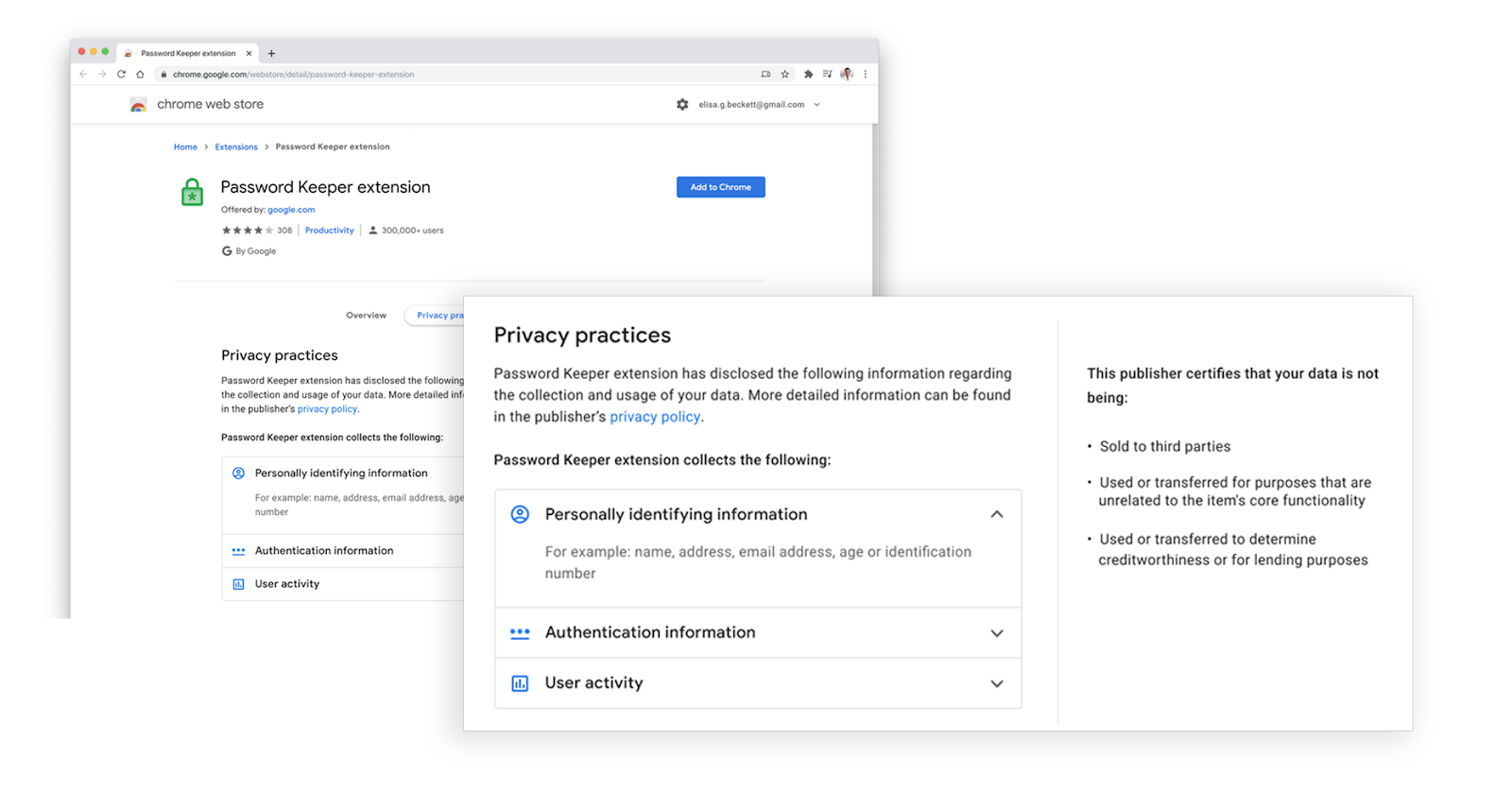
Today, we are announcing changes that build upon those protections with an update to our developer policy that limits what extension developers can do with the data they collect. The new policy also requires developers to certify their data use practices, and display that information directly on the Chrome Web Store listing to help users understand an extension’s privacy practices.
Starting January 2021, each extension’s detail page in the Chrome Web Store will show developer-provided information about the data collected by the extension, in clear and easy to understand language. Data disclosure collection is available to developers today.
We are also introducing an additional policy focused on limiting how extension developers use data they collect. More specifically:
Ensuring the use or transfer of user data is for the primary benefit of the user and in accordance with the stated purpose of the extension.
Reiterating that the sale of user data is never allowed. Google does not sell user data and extension developers may not do this either.
Prohibiting the use or transfer of user data for personalized advertising.
Prohibiting the use or transfer of user data for creditworthiness or any form of lending qualification and to data brokers or other information resellers.
The item listing page will also display whether the developer has certified that their extension complies with this new policy.
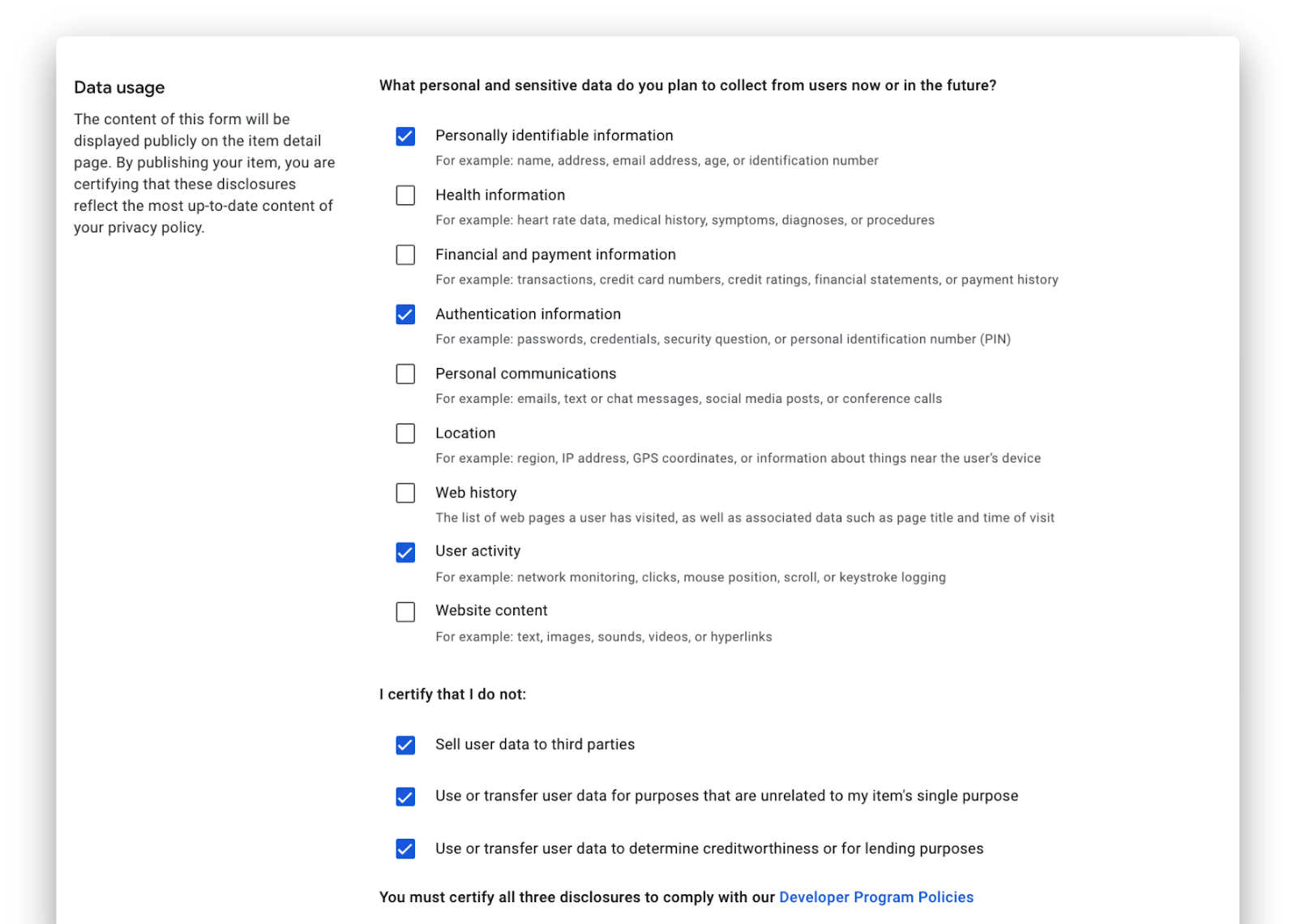
To publish or update an extension, our new policy will require developers to provide data usage disclosures directly from the privacy tab of the developer dashboard. These disclosures include:
The nature of the data being collected from users.
The developer’s certification that they comply with the new Limited Use policy.
The disclosure form is grouped by category to make it simpler for developers, and maps exactly to the disclosures that will be displayed to Chrome users. Most of this information will be consistent with existing privacy policies that developers have provided to the Chrome Web Store.
Data disclosures collection will be made available to developers today, and will be displayed on the Chrome Web Store listing starting January 18, 2021.
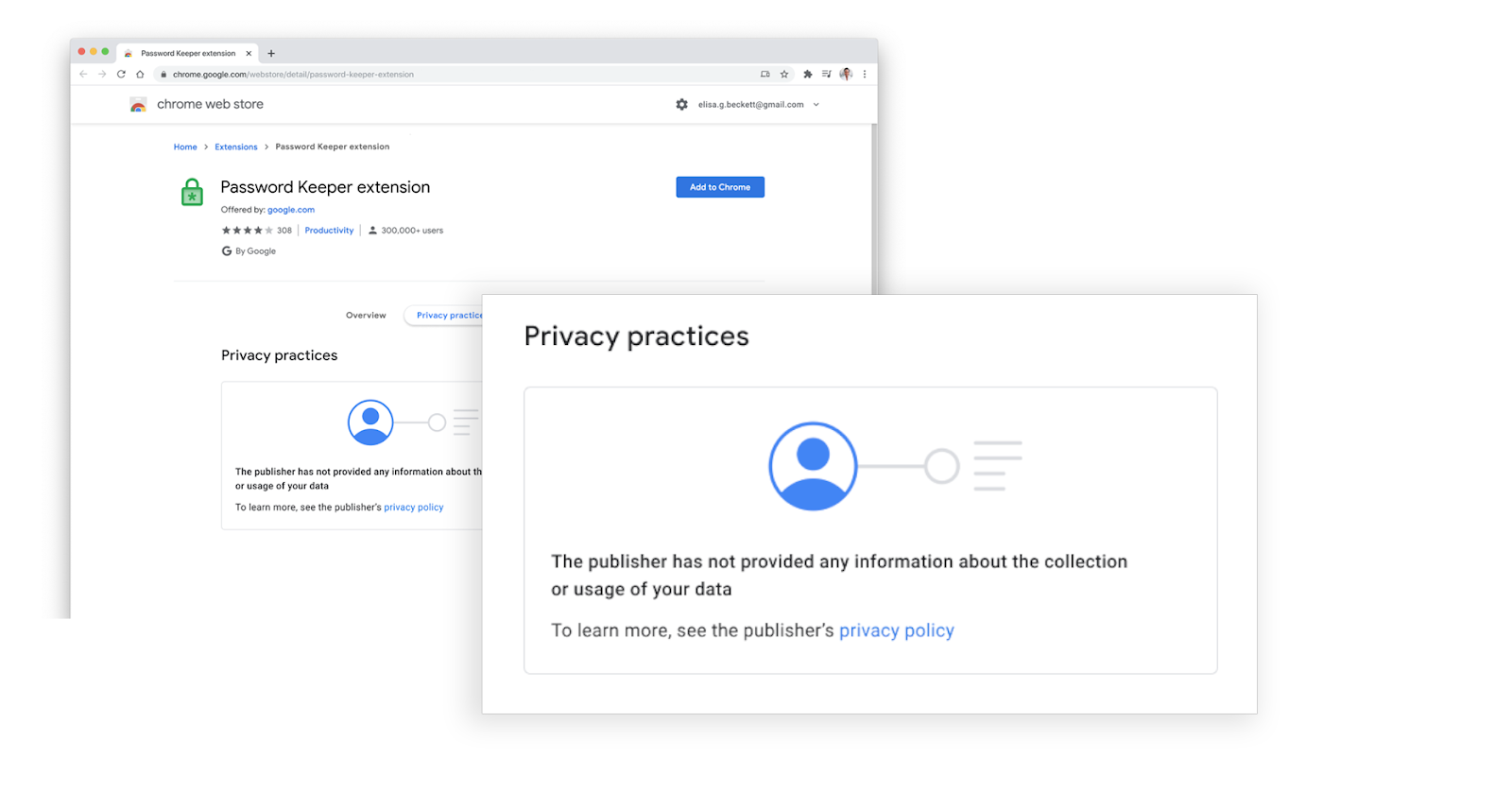
For developers who have not yet provided privacy disclosures by January 18, 2021, a notice will be shown on their Chrome Web Store listings to inform users that the developer hasn’t certified that they comply with the Limited Use policy yet.
You can find the full policy in the Developer Program Policies page as well as additional details in the User Data FAQ .
Thank you for working with us to build a better web with transparency, choice, and control for everyone.
Posted by Alexandre Blondin and Mark M. Jaycox, Chrome Product & Policy
Although notifications on the web are useful for a variety of applications, they can also be misused for phishing, malware or fake messages that imitate system notifications for the purpose of generating user interactions.
In Chrome 86, we’ve expanded on previous efforts [1] [2] to improve the quality of the web notification ecosystem by adding enforcement for websites sending abusive notification content. This includes sites sending messages containing links to malware or that seek to spoof system administrative messages.
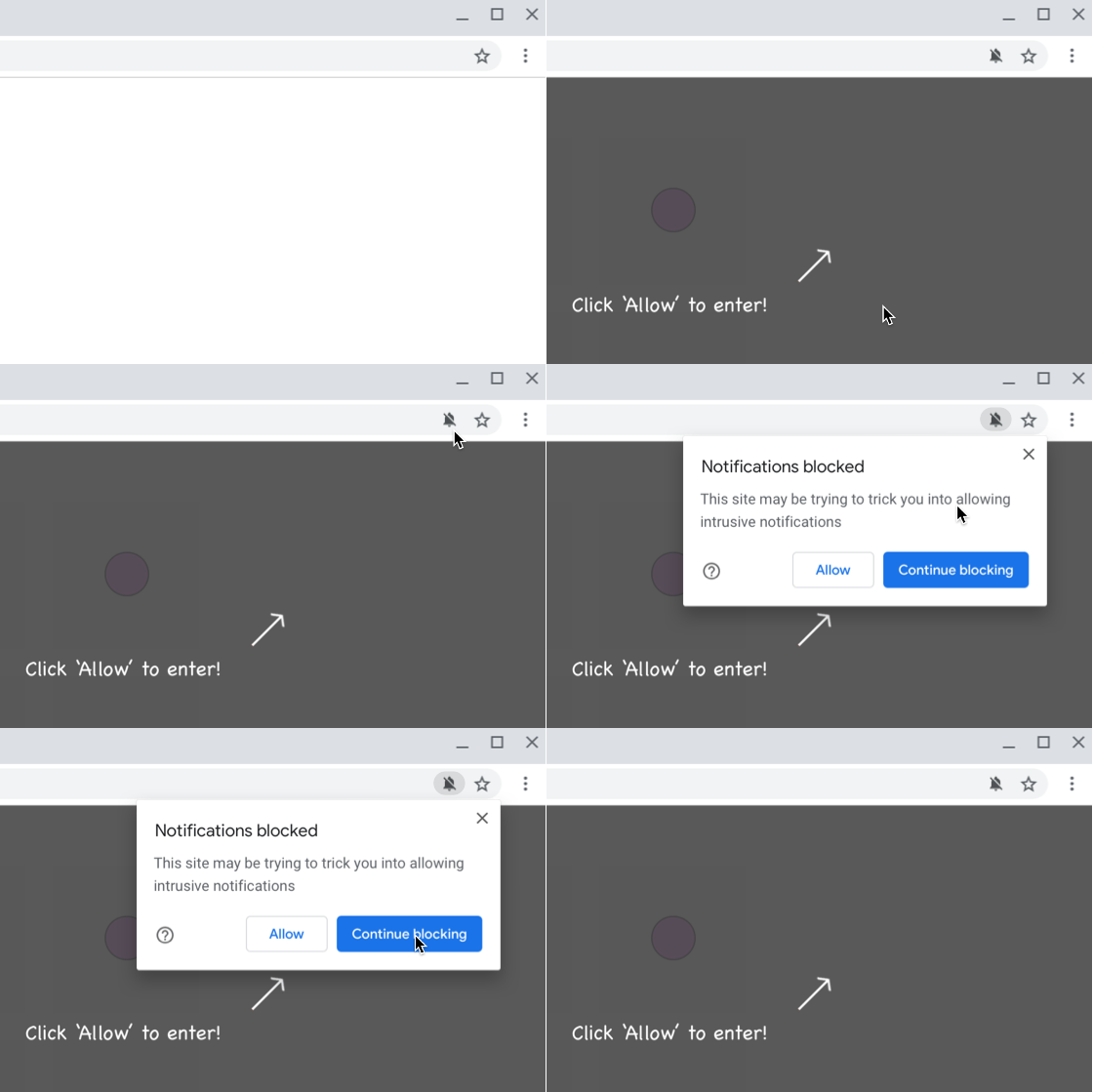
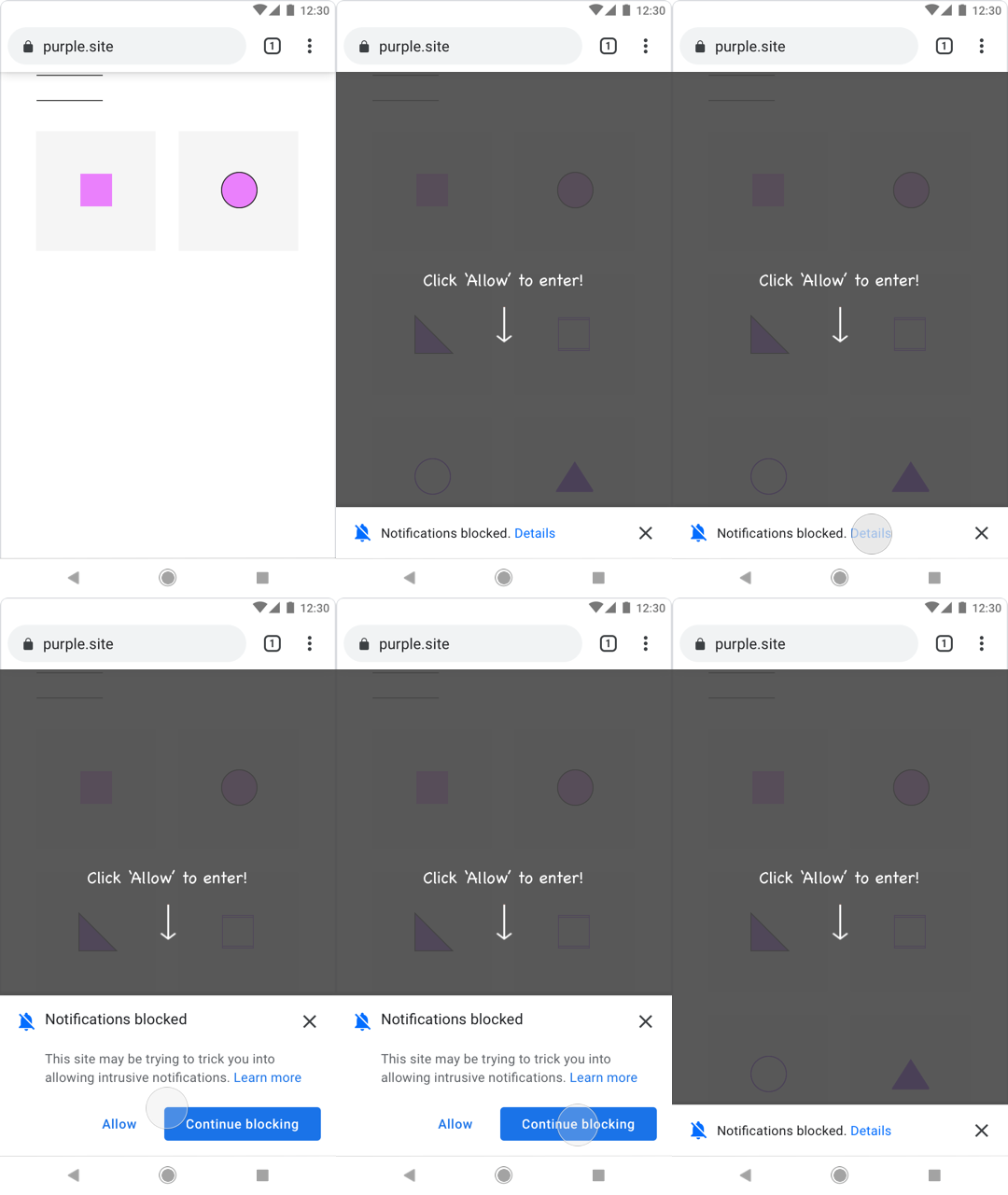
When abusive notification content is detected on an origin, Chrome will automatically display the permission requests using a quieter UI, shown below.
Chrome 80 introduced the quiet Notification permission UI. Chrome 84 announced auto-enrolment in quiet notification UI for websites with abusive notification permission requests, such as sites that use deceptive patterns to request notification permission.
The new enforcement in Chrome 86 focuses on notification content and is triggered by sites that have a history of sending messages containing abusive content. This treatment applies to sites that try to trick users into accepting the notification permission for malicious purposes, for example sites that use web notifications to send malware or to mimic system messages to obtain user login credentials.
Desktop UI for quiet notifications UI on abusive websites. The new UI discourages users from allowing notifications from these websites.
Mobile UI for quiet notifications on abusive websites. The new UI discourages users from allowing notifications from these websites.
This UI exactly matches the UI that was previously announced for Chrome 84. The only difference is in Chrome 86 we will begin blocking notification permission requests when sites have a pattern of sending abusive notification content.
Abusive notification prompts are one of the top user complaints we receive about Chrome. Our goal with these changes is to improve the experience for Chrome users and to reduce the incentive for abusive sites to misuse the web notifications feature.
Google’s automated web crawling service will occasionally subscribe to website push notifications if the push permission is requested. Notifications that are sent to the automated Chrome instances, using Safe Browsing technology, will be evaluated for abusive content, and sites sending abusive notifications will be flagged for enforcement if the issue is unresolved.
When a site is found to be in “Failing” status for any type of notification abuse, Search Console will send an email to registered site owners and users in the site's Search Console at least 30 calendar days prior to the start of enforcement. During the 30 day grace period websites can address the issue and request another review.
We recommend concerned site owners and developers review the Abusive Notifications Report in Search Console. The Search Console help center has additional information on the Abusive Notifications Report and the abusive notification review process.
The Search Console help center has a guide for how to fix abusive notifications and request another review of your website.
Prior to the release of Chrome’s abusive notifications protections, many users have already unintentionally allowed notifications from websites engaging in abusive activity. In an upcoming release, Chrome will revert the notification permission status from “granted” to “default” for abusive origins, preventing further notifications unless the user returns to the abusive origin and re-enables notifications.
We’ll be listening for feedback from users and developers about the effectiveness of current enforcements and may make further changes based on that feedback.
Unless otherwise noted, changes described below apply to the newest Chrome beta channel release for Android, Chrome OS, Linux, macOS, and Windows. Learn more about the features listed here through the provided links or from the list on ChromeStatus.com. Chrome 87 is beta as of October 15, 2020.
Testing web authentication has long been difficult because developers need devices to test their code. Starting in Chrome 87, authentication can be emulated and debugged using a new panel in DevTools. You can find the panel in DevTools by selecting More options, then More tools, then WebAuthn. To learn how to use it, see the section in What's New in DevTools (Chrome 87).
Room-scale video conferencing solutions deploy cameras with pan, tilt, and zoom capabilities so that software can point the camera at meeting participants. Starting in Chrome 87, the pan, tilt, and zoom features on cameras are accessible to websites using media track constraints in MediaDevices.getUserMedia() and MediaStreamTrack.applyConstraints().
MediaDevices.getUserMedia()
MediaStreamTrack.applyConstraints()
Websites are only allowed to control these capabilities when users explicitly grant permission. For details on using the new capabilities and a demo, see Control camera pan, tilt, and zoom.
The trend in CSS for many years has been to supplement physical properties with logical properties. Properties that assume language flows left to right and top to bottom don't work in non-European text such as vertical Chinese text, or Arabic. Modern CSS rules use flow-relative terms like start and end and provide rules for dealing with the text's axis (direction).
The first step in implementing this in Chrome was to implement the most granular flow-relative features of the CSS Logical Properties and Values spec. Chrome 87 ships shorthands and offsets to make these logical properties and values a bit easier to write. What was once written with multiple CSS rules can now be written as one. For example, separate rules for margin-block-start and margin-block-end may now be written using a single margin-block property.
margin-block-start
margin-block-end
margin-block
For a list of all flow-relative shorthands now supported by Chrome, and explanations for how to use them, see Logical layout enhancements with flow-relative shorthands. For more CSS-related updates, see the CSS section, below.
Origin trials allow you to try new features and give feedback on usability, practicality, and effectiveness to the web standards community. The following feature, previously in a Chrome origin trial, is now enabled by default.
The Cookie Store API exposes HTTP cookies to service workers and offers an asynchronous alternative to document.cookie.
document.cookie
Chrome 87 has a number of changes related to cross-origin isolation. Chrome will now use origin instead of site as agent cluster key for cross-origin isolated agent clusters. Mutation of document.domain is no longer supported for cross-origin isolated agent clusters. This change also introduces window.crossOriginIsolated, a boolean that indicates whether APIs that require cross-origin isolation are allowed to use it. Supporting APIs include:
window.crossOriginIsolated
performance.measureMemory()
Adds the disallowdocumentaccess property to disallow cross-document scripting between iframes from the same origin in the same parent document. This also puts same-origin iframes in separate event loops.
disallowdocumentaccess
Note: This item was pulled from Chrome 87 beta and was not in later builds.
Sometimes long-running scripts block user input. A lag between a user's action and a response by an app is a bad user experience. To address this, Chrome has added a method called isInputPending(), accessible from navigator.scheduling, which can be called from long-running operations. You can find an example of the method's use in the draft spec.
isInputPending()
navigator.scheduling
HTTP range requests, which have been available in major browsers for several years, allow servers to send requested data to the client in chunks. This has proved especially useful for large media files where the user experience is improved through smoother playback and improved pause and resume functions.
Historically, range requests and services workers did not work well together, forcing developers to build work-arounds. Starting in Chrome 87, passing range requests through to the network from inside a service worker will "just work."
For an explanation of the issues with range requests and what's changed in Chrome 87, see Handling range requests in a service worker.
Transferable streams now allows ReadableStream, WritableStream, and TransformStream objects to be passed as arguments to postMessage(). The streams APIs provide ubiquitous, interoperable primitives for creating, composing, and consuming streams of data. A natural thing to do with a stream is to pass it to a web worker. This provides a fluent primitive for offloading work to another thread.
ReadableStream
WritableStream
TransformStream
Offloading work onto a worker is important for a smooth user experience, but the ergonomics can be awkward. Transferable streams solve this problem for streams. Once the stream itself has been transferred, the data is transparently cloned in the background.
The ontransitionrun, ontransitionstart, and ontransitioncancel event handler attributes allow developers to add event listeners for 'transitionrun', 'transitionstart', and 'transitioncancel' events on elements, Document objects, and Window objects.
ontransitionrun
ontransitionstart
ontransitioncancel
'transitionrun'
'transitionstart'
'transitioncancel'
The WakeLockSentinel object has a new property called released that indicates whether a sentinel has already been released. It defaults to false and changes to true when a release event is dispatched. The new attribute helps web developers know when locks are released so that they do not need to keep track of them manually.
WakeLockSentinel
released
New @font-face descriptors have been added to ascent-override, descent-override, and line-gap-override to override metrics of the font. This Improves interoperably across browsers and operating systems, so that the same font always looks the same on the same site, regardless of OS or browser. Additionally, it aligns metrics between two web fonts present simultaneously, but for different glyphs. Finally, it overrides font metrics for a fallback font to emulate a web font, to minimize cumulative layout shift.
@font-face
ascent-override
descent-override
line-gap-override
Chrome now supports several new text decoration and underline properties. These properties solve use cases where underlines are too close to the text baseline and ink-skipping triggers too early in a text run. These use cases solve problems caused by the launch of the text-decoration-skip-ink property. The new properties are text-decoration-thickness, text-underline-offset and a from-font keyword for text-underline-position.
text-decoration-skip-ink
text-decoration-thickness
text-underline-offset
from-font
text-underline-position
CSS2 allowed browsers to define the default value for the quotes property, which Chrome formerly followed. Chrome 87 now follows CSS Generated Content Module Level 3 in which the 'auto' keyword is the default value. That spec requires that a typographically appropriate value be used for quotes based on the content language of the element and/or its parent.
'auto'
This version of Chrome incorporates version 8.7 of the V8 JavaScript engine. It specifically includes the changes listed below. You can find a complete list of recent features in the V8 release notes.
Chrome now supports Atomics.waitAsync(), the async version of Atomics.wait(). Atomics.waitAsync() allows programmers to wait on a SharedArrayBuffer location in the same fashion as Atomics.wait() but returns a Promise instead.
Atomics.waitAsync()
Atomics.wait() blocks the thread and cannot be used on the main web browser thread, where blocking is disallowed. This makes coordination via SharedArrayBuffers between the main thread and worker threads more ergonomic.
SharedArrayBuffers
Permissions policy declarations in an <iframe> tag can no longer use commas as a separator between items. Developers should use semicolons instead.
Blink will no longer support the rarely-used -webkit-font-size-delta property. Developers should use font-size to control font size instead.
-webkit-font-size-delta
font-size
Chrome is deprecating and removing support for FTP URLs. The current FTP implementation in Google Chrome has no support for encrypted connections (FTPS), nor proxies. Usage of FTP in the browser is sufficiently low that it is no longer viable to invest in improving the existing FTP client. In addition, more capable FTP clients are available on all affected platforms. Google Chrome 72 and later removed support for fetching document subresources over FTP and rendering of top level FTP resources. Currently navigating to FTP URLs results in showing a directory listing or a download depending on the type of resource. A bug in Google Chrome 74 and later resulted in dropping support for accessing FTP URLs over HTTP proxies. Proxy support for FTP was removed entirely in Google Chrome 76. In Chrome 86, FTP was turned off for pre-release channels (Canary and Beta) and was experimentally turned off for one percent of stable users. The remaining capabilities of Google Chrome's FTP implementation are restricted to either displaying a directory listing or downloading a resource over unencrypted connections.
Remainder of the deprecation follows this timeline:
FTP support will be disabled by default for fifty percent of users but can be enabled using the flags listed above.
FTP support will be disabled.