Chromium Blog
News and developments from the open source browser project
Charting Browser Interoperability
Thursday, August 30, 2018
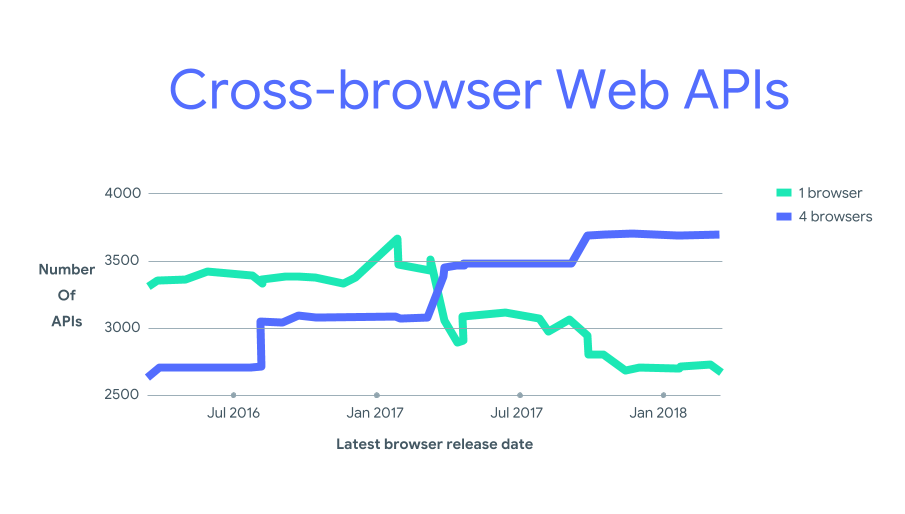
At this year's Google I/O, Ben Galbraith and Malte Ubl
presented a chart
during the Web keynote showing how the web is getting more interoperable:
This trend is really important to the Chrome team: web developers should be able to target
the web platform
, not four different (though overlapping) platforms. The chart was gleaned from the data in our
Web API Confluence Dashboard
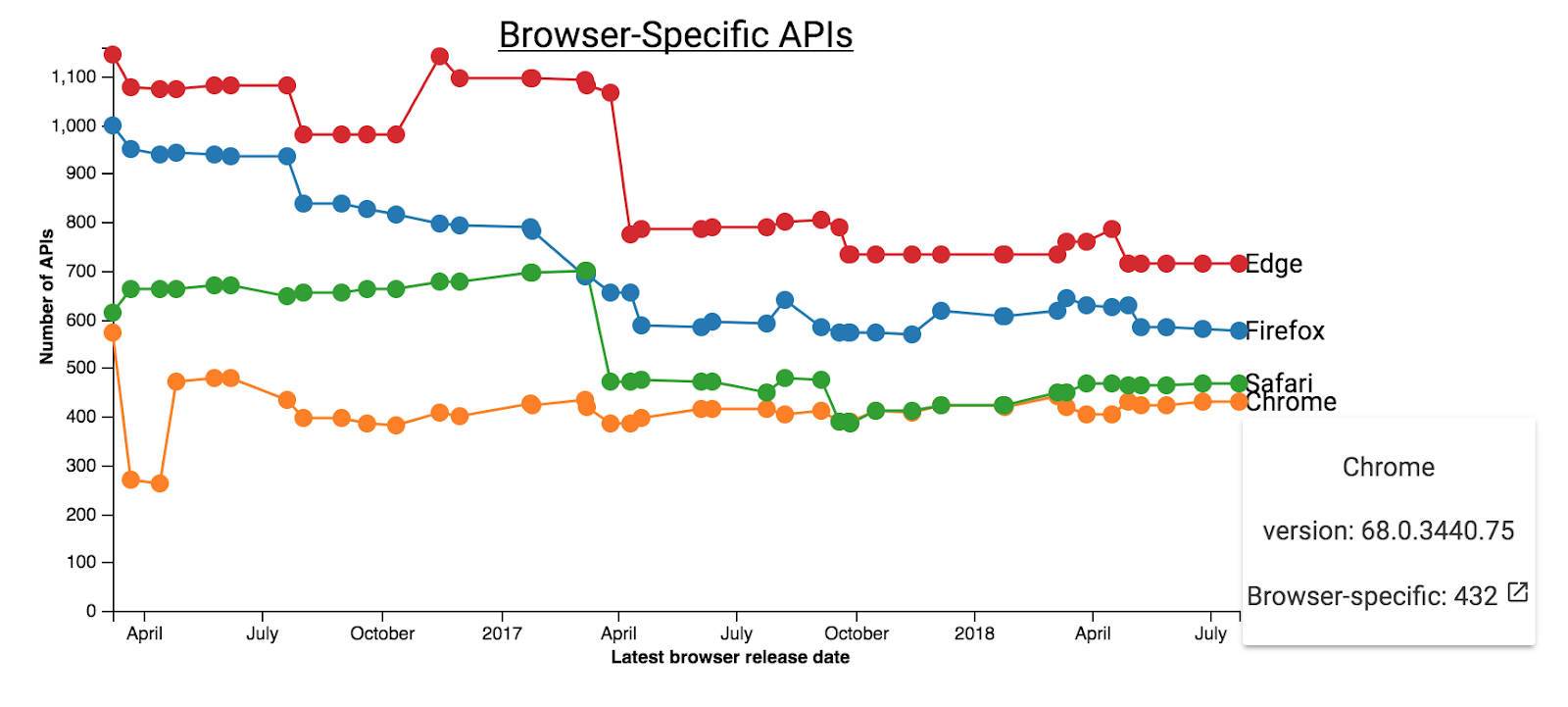
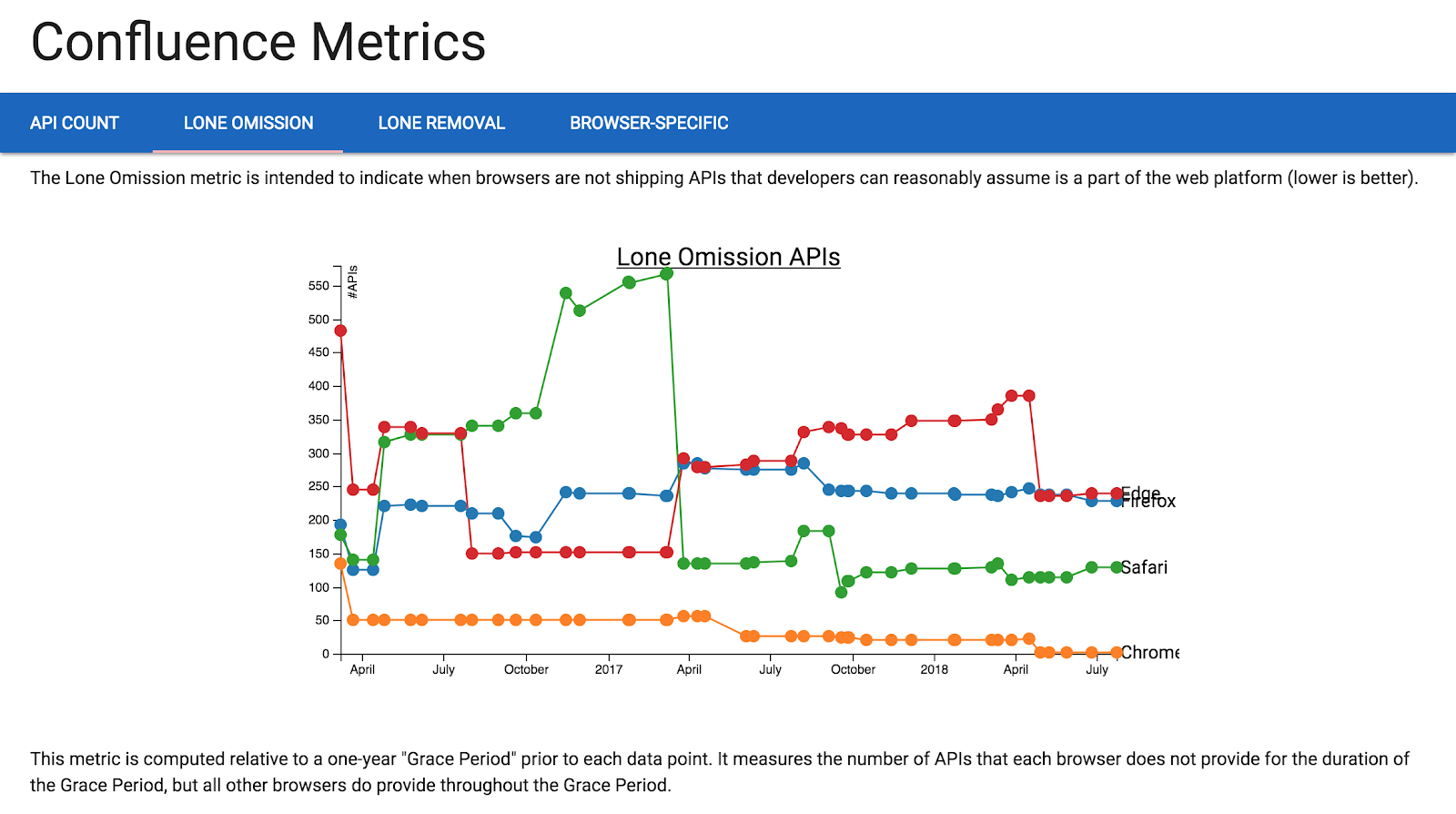
. This project, originally designed for browser engineers, provides insights into web interoperability by tracking page-visible JavaScript APIs across many releases of the four major browser engines. Here’s an example:
Caption: Count of browser-specific APIs goes up when browsers are first to ship a new API, and down when either (i) a second browser implements a new API, or (ii) an API that failed to build consensus is removed by the one browser that implemented it.
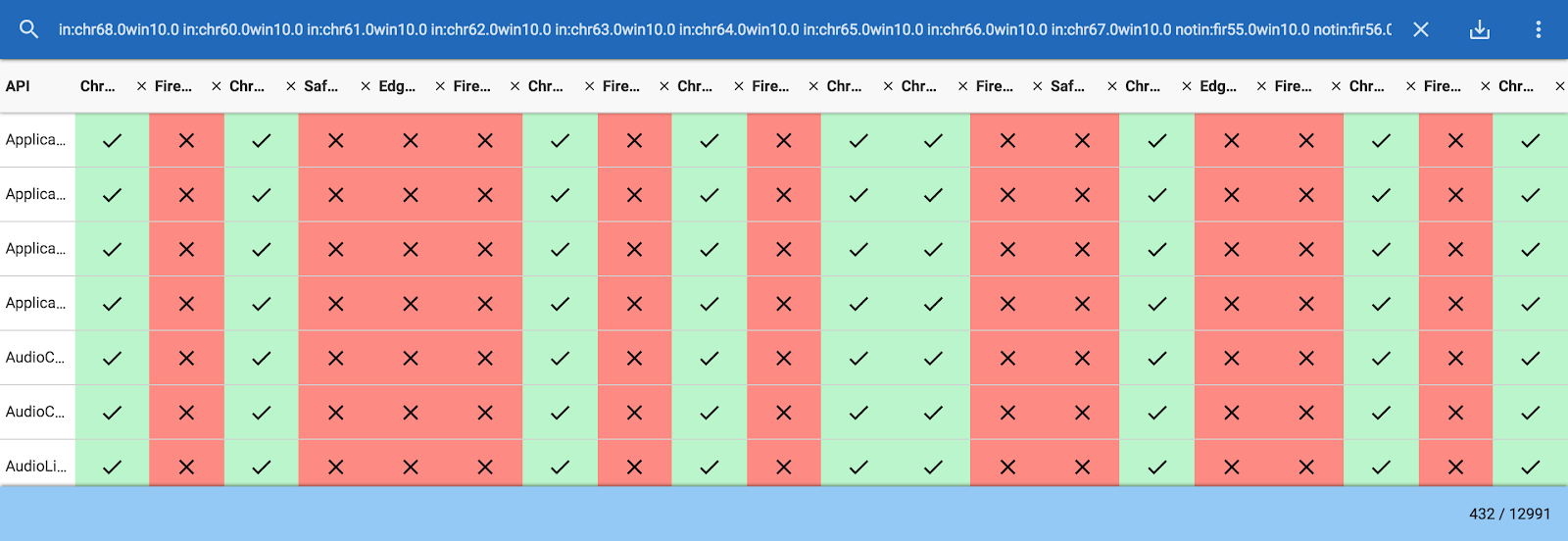
This chart plots a count of APIs shipped by only one of the four browser vendors over time. Interacting with the chart on the dashboard lets you open the list of APIs that corresponds to each count:
This information helps browser vendors prioritize work that will make the web more interoperable by either removing old browser-specific APIs or working with other vendors to implement APIs that are not yet widely supported.
How APIs are collected
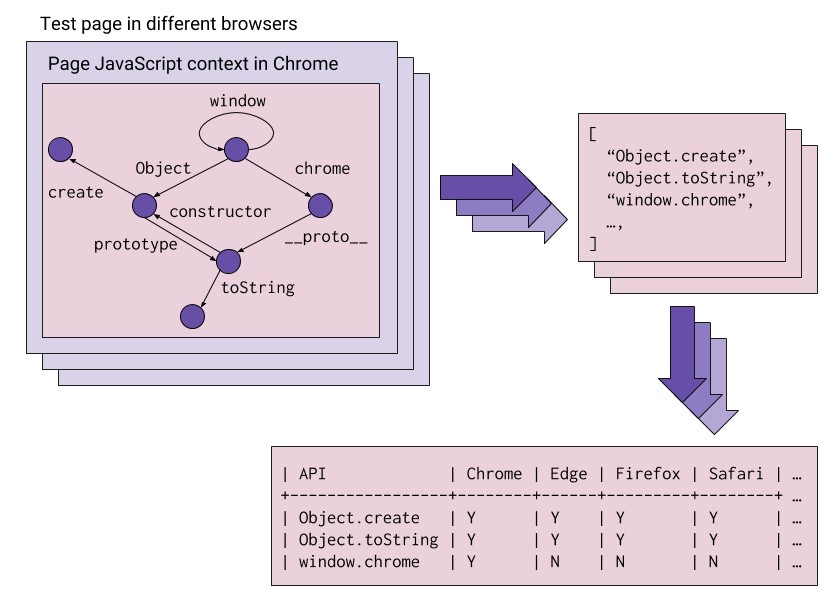
In order to count APIs on the web, we first had to define what counts as a “web API”. The web is full of useful features, some of which are hard to define let alone detect. For this analysis we focused on JavaScript APIs that are visible to the developer when the page first loads. This leaves out several classes of feature, like CSS properties, HTML attributes, and APIs that are not available on page load (e.g., APIs are surfaced through interaction user/API interactions, or only available in certain types of workers). Nevertheless, it gives us a general view of programmable browser capabilities.
Our
JavaScript API-finding algorithm
inspects the JavaScript object graph exposed on the global
window
object. Check out the link for details on how we managed to extract APIs from JavaScript prototypes. With the help of
BrowserStack
’s 1000+ browser/operating system configurations, we were able to gather API data for browser releases going back as far as 2012
.
Determining if the web is healthy
Take a look at the
metrics page
on the dashboard and you’ll see a few different charts we’ve generated about the shape of the web. These metrics, and the APIs they represent, give web platform implementers insights into which APIs are fragmenting the web. APIs that fragment the web are:
Shipped by
almost
every browser, but not quite;
Removed by one browser, but not others; or
Shipped by one browser, but not others.
For example, our data shows that Safari is the only major browser that does not ship
CSSStyleDeclaration#backfaceVisibility
, Chrome has removed a number of
SVGSVGElement
APIs that are still shipped by all major browsers, and Edge is the only major browser shipping a number of
BhxBrowser
APIs.
Querying the raw data yourself
The dashboard isn’t intended to replace tools like
MDN Docs
or
caniuse.com
, but rather to illustrate trends that help browser vendors keep evolving the web towards interoperability. That said, the
catalog page
on the dashboard can give developers another source to corroborate interop info from manually curated sources. Try playing around with the search box above the API catalog. It supports some
basic structured queries
like
in:firefox60 or notin:chrome66
for APIs in Firefox 60 or missing from Chrome 66, or
RTCPeerConnection count:2
for RTCPeerConnection-related APIs shipped by exactly two of the browsers currently in view. Clicking the vertical ellipsis icon lets you add or remove dozens of browser releases from the grid, and the URL bar always contains a link that will get you back to the current query.
Validating MDN browser compat tables
We’ve also started using the data to help tech writers
programmatically check their contributions
to MDN’s excellent browser compatibility database. Try this out:
# Clone MDN’s browser compatibility database
git clone https://github.com/mdn/browser-compat-data.git
cd browser-compat-data
# Install dependencies
npm install
# Load confluence data for ServiceWorker
npm run confluence -- --interfaces=ServiceWorker
# Take a look at the differences that have been applied to your working tree
git diff
# Read the full list of parameters you can try on `npm run confluence`
npm run confluence -- --help
Conclusion
We hope both browser engineers and web developers can benefit from the dashboard. Check it out and let us know what you think over at
the GitHub project
that hosts the code.
Posted by Mark Dittmer, Software Engineer working on Web Ecosystem Infrastructure
Labels
$200K
1
10th birthday
4
abusive ads
1
abusive notifications
2
accessibility
3
ad blockers
1
ad blocking
2
advanced capabilities
1
android
2
anti abuse
1
anti-deception
1
background periodic sync
1
badging
1
benchmarks
1
beta
83
better ads standards
1
billing
1
birthday
4
blink
2
browser
2
browser interoperability
1
bundles
1
capabilities
6
capable web
1
cds
1
cds18
2
cds2018
1
chrome
35
chrome 81
1
chrome 83
2
chrome 84
2
chrome ads
1
chrome apps
5
Chrome dev
1
chrome dev summit
1
chrome dev summit 2018
1
chrome dev summit 2019
1
chrome developer
1
Chrome Developer Center
1
chrome developer summit
1
chrome devtools
1
Chrome extension
1
chrome extensions
3
Chrome Frame
1
Chrome lite
1
Chrome on Android
2
chrome on ios
1
Chrome on Mac
1
Chrome OS
1
chrome privacy
4
chrome releases
1
chrome security
10
chrome web store
32
chromedevtools
1
chromeframe
3
chromeos
4
chromeos.dev
1
chromium
9
cloud print
1
coalition
1
coalition for better ads
1
contact picker
1
content indexing
1
cookies
1
core web vitals
2
csrf
1
css
1
cumulative layout shift
1
custom tabs
1
dart
8
dashboard
1
Data Saver
3
Data saver desktop extension
1
day 2
1
deceptive installation
1
declarative net request api
1
design
2
developer dashboard
1
Developer Program Policy
2
developer website
1
devtools
13
digital event
1
discoverability
1
DNS-over-HTTPS
4
DoH
4
emoji
1
emscriptem
1
enterprise
1
extensions
27
Fast badging
1
faster web
1
features
1
feedback
2
field data
1
first input delay
1
Follow
1
fonts
1
form controls
1
frameworks
1
fugu
2
fund
1
funding
1
gdd
1
google earth
1
google event
1
google io 2019
1
google web developer
1
googlechrome
12
harmful ads
1
html5
11
HTTP/3
1
HTTPS
4
iframes
1
images
1
incognito
1
insecure forms
1
intent to explain
1
ios
1
ios Chrome
1
issue tracker
3
jank
1
javascript
5
lab data
1
labelling
1
largest contentful paint
1
launch
1
lazy-loading
1
lighthouse
2
linux
2
Lite Mode
2
Lite pages
1
loading interventions
1
loading optimizations
1
lock icon
1
long-tail
1
mac
1
manifest v3
2
metrics
2
microsoft edge
1
mixed forms
1
mobile
2
na
1
native client
8
native file system
1
New Features
5
notifications
1
octane
1
open web
4
origin trials
2
pagespeed insights
1
pagespeedinsights
1
passwords
1
payment handler
1
payment request
1
payments
2
performance
20
performance tools
1
permission UI
1
permissions
1
play store
1
portals
3
prefetching
1
privacy
2
privacy sandbox
4
private prefetch proxy
1
profile guided optimization
1
progressive web apps
2
Project Strobe
1
protection
1
pwa
1
QUIC
1
quieter permissions
1
releases
3
removals
1
rlz
1
root program
1
safe browsing
2
Secure DNS
2
security
36
site isolation
1
slow loading
1
sms receiver
1
spam policy
1
spdy
2
spectre
1
speed
4
ssl
2
store listing
1
strobe
2
subscription pages
1
suspicious site reporter extension
1
TCP
1
the fast and the curious
28
TLS
1
tools
1
tracing
1
transparency
1
trusted web activities
1
twa
2
user agent string
1
user data policy
1
v8
6
video
2
wasm
1
web
1
web apps
1
web assembly
2
web developers
1
web intents
1
web packaging
1
web payments
1
web platform
1
web request api
1
web vitals
1
web.dev
1
web.dev live
1
webapi
1
webassembly
1
webaudio
3
webgl
7
webkit
5
WebM
1
webmaster
1
webp
5
webrtc
6
websockets
5
webtiming
1
writable-files
1
yerba beuna center for the arts
1
Archive
2026
Mar
2025
Oct
Jul
Jun
May
Jan
2024
Dec
Aug
Jun
May
Apr
Mar
Feb
2023
Nov
Oct
Sep
Aug
Jun
May
Apr
Feb
2022
Dec
Sep
Aug
Jun
May
Apr
Mar
Feb
Jan
2021
Dec
Nov
Oct
Sep
Aug
Jul
Jun
May
Apr
Mar
Feb
Jan
2020
Dec
Nov
Oct
Sep
Aug
Jul
Jun
May
Apr
Mar
Feb
Jan
2019
Dec
Nov
Oct
Sep
Aug
Jul
Jun
May
Apr
Mar
Feb
Jan
2018
Dec
Nov
Oct
Sep
Aug
Jul
Jun
May
Apr
Mar
Feb
Jan
2017
Dec
Nov
Oct
Sep
Aug
Jul
Jun
May
Apr
Mar
Feb
Jan
2016
Dec
Nov
Oct
Sep
Aug
Jun
May
Apr
Mar
Feb
Jan
2015
Dec
Nov
Oct
Sep
Aug
Jul
Jun
May
Apr
Mar
Feb
Jan
2014
Dec
Nov
Oct
Sep
Aug
Jul
Jun
May
Apr
Mar
Feb
Jan
2013
Dec
Nov
Oct
Sep
Aug
Jul
Jun
May
Apr
Mar
Feb
Jan
2012
Dec
Nov
Oct
Sep
Aug
Jul
Jun
May
Apr
Mar
Feb
Jan
2011
Dec
Nov
Oct
Sep
Aug
Jul
Jun
May
Apr
Mar
Feb
Jan
2010
Dec
Nov
Oct
Sep
Aug
Jul
Jun
May
Apr
Mar
Feb
Jan
2009
Dec
Nov
Sep
Aug
Jul
Jun
May
Apr
Mar
Feb
Jan
2008
Dec
Nov
Oct
Sep
Feed
Follow @ChromiumDev
Give us feedback in our
Product Forums
.